The JAMstack is a way to create a "static" website that is very fast and secure. This technique began gaining attention among professionals in 2018/2019 and is growing in popularity. It addresses a problem every site has to solve: combining performance and security while keeping hosting and maintenance costs in check.
What is the JAMstack?
To understand the specificity of the JAMstack, we must first revisit how a traditional website functions. When you want to display a page on a site built with a CMS (WordPress, Sanity, or others), files are executed to make requests to a database. This allows the "construction" of the requested page, particularly displaying text and images stored in the database. If you refresh the page, the same process repeats: your site makes a request to your database, and the page is constructed with the received information.
A JAMstack site works differently. Your site is entirely generated beforehand, making a call to your data source only once to integrate the content across all pages. When you want to display a page, the page is already "constructed," so there's no database call. Refresh and you get the same pre-generated page again.
This approach avoids repeatedly querying a database for pages that don't change, or pages whose content doesn't depend on who's viewing them. A company's presentation page or its services page is the same whether it loads from Paris or Tokyo, so there's no point rebuilding it on every visit. JAMstack solves this by serving a pre-generated page.
Serving pre-generated pages is why we call this a "static site." Take that label with a LARGE grain of salt. Historically, a "static site" meant either a site that wasn't updated often, or one with a dated interface, or a site running without a database on raw HTML files. None of that applies to JAMstack. Here, "static" simply means the pages are pre-generated rather than built on every visitor request. Far from feeling dated, a JAMstack static site is one of the most modern ways to build for the web today, leveraging the full JavaScript ecosystem.
A much faster website!
Why switch to a JAMstack site? First, because performance is genuinely excellent. Serving static pages without systematically hitting a database speeds things up. JAMstack sites are also optimized for compression and minification, so your site is much lighter, and therefore faster.
Here's an example with the same site (same images, same look, same text) designed with WordPress and a version designed in JAMstack (using the static site generator Gatsby and the WordPress API).
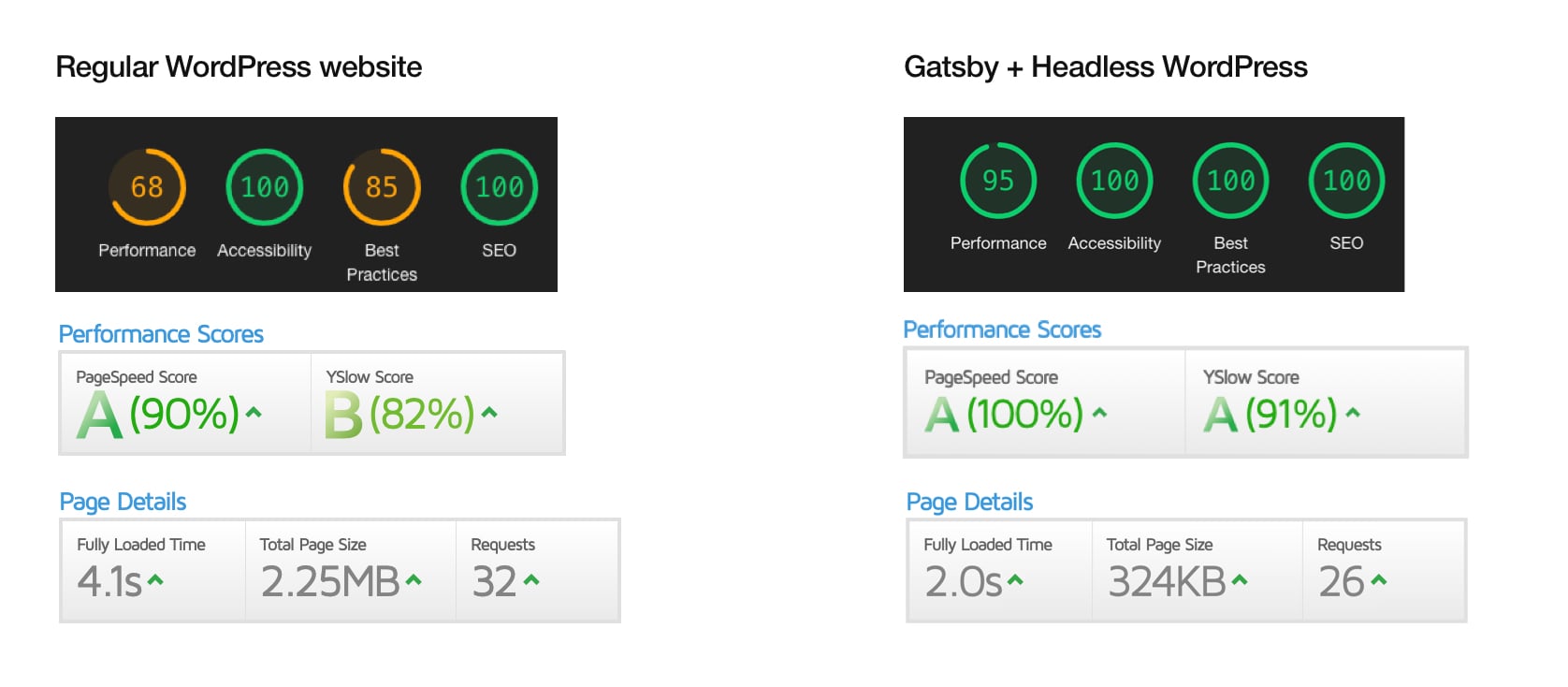
In the end, we have a site that loads twice as fast with a homepage whose size has been reduced by seven times! With mobile browsing still growing, a faster site means lower bounce rates, better engagement, and ultimately more leads from your website.
A static site is secure by default
Most website hacks happen because files get modified or the database is attacked. A JAMstack site is static and doesn't talk directly to a database, which removes one major risk. The files aren't corruptible either, because they're not hosted on a traditional FTP but on a CDN. Standard hacks no longer have a target to hit.
Handling traffic spikes
Another upside of a static site: it handles traffic spikes far better. During a load surge, a classic site can crash because the database gets hammered. A static site doesn't query the database on every page view, so those load issues disappear. The site absorbs traffic spikes while keeping its loading speed.
Excellent SEO
These performance gains also influence the quality of your site's SEO, its natural referencing. With equal content, search engines will always favor a lighter and faster site.
A more economical site
Who says a more secure and lighter site also means lighter maintenance and hosting. Opting for JAMstack also allows you to have a website whose cost will be lower than a site with a traditional CMS.
… and more environmentally friendly!
One last point worth highlighting: a static site favors eco-design. Every time a site queries a database and generates a page, it burns energy. With web traffic still growing, we need solutions that make those operations more resource-efficient to limit their carbon footprint. JAMstack is a tangible answer to that.
Using WordPress in JAMstack mode
So, is this the end of WordPress? Not at all. You can perfectly well "plug" a WordPress site in to power a static site. In practice, the static site's pages are generated from the data stored in WordPress. You can even automate a fresh build of the static site whenever content gets updated in the CMS. You keep WordPress's strength (an easy editorial interface) while picking up the benefits of JAMstack.
In this setup, you no longer use WordPress themes or some plugins. You only use the WordPress API and run it as a "Headless CMS." This is what's called a decoupled approach.
Designing a site using the JAMstack approach is not yet the most common method today because it requires additional technical skills. It is primarily adopted by major web players or companies seeking top performance. However, given the performance, security, and resilience benefits of this type of architecture, I believe this approach will keep gaining ground in the coming years.